The number of brands on our site continues to grow. We have a convenient list of all our brands available (brand overview), but going through hundreds of brands one by one will be a very time-consuming task.
To save you time and to make it more convenient, we created a visual listing of our brands to help you quickly identify the brands that have the right look for your shop. So check out our new brand style gallery page and keep reading to learn how to make good use of this new page.
Brand card
The brand style gallery shows a brand card for each brand. The brand card shows a lot of helpful information about the brand. Let’s have a closer look using the example below.
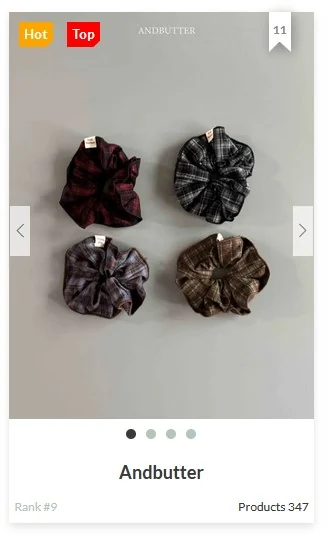
Most prominent on the brand card are the images. The brand card will show the images of the 4 most recent products for that brand. You can use the arrows (or swipe on your touchscreen) to see the next image. The images that are displayed dynamically match the filters that are applied. So for example, if you select ‘Bags’ from the Product type filters then the images on the brand card will be the catalog images from products with the Bag attribute.
Directly below the image is the brand name. You can click on the brand to see the full collection for that brand.
In the top left corner are sometimes labels that highlight remarkable brands. If you click the label or hover your mouse over it, it will tell you more about the meaning. These are the possible labels you might see:
- NEW: Label in white. Description >> Brand is new this season.
- HOT: Label in orange. Description >> Brand is in top 15 in week ranking.
- TOP: Label in red. Description >> Brand is in top 15 in season ranking.
- FAV: Label in blue. Description >> Brand is in top 15 in bookmark ranking.
- TIP: Label in yellow. Description >> Brand is a featured brand.
The top right of the brand card will show the bookmark icon. Upon clicking it, the brand will be added to your Favorite Brands list. The bookmark icon will be a dark color (dark fill) if the brand is already listed among your favorite brands. The number in the icon shows how many people have bookmarked this brand as their favorite brand.
The bottom left of the brand card shows the brand’s rank. The ranking is based on the weekly sales figures. Check here for the current top 15 brands.
The bottom right corner of the brand card shows the product count. The count will be updated to match the filters that are applied. So for example, if you select the ‘Bags’ filter, then the count will show the number of products with the Bag attribute for that brand. Continue reading to learn more about the filters.
Filters
The brand style gallery has useful filter functions to help you narrow down the selection of brands to fit your specific interests.
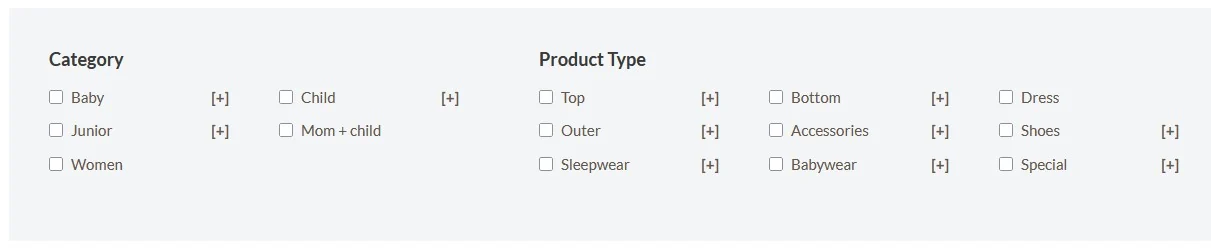
You can select multiple filters, in which case the AND logic applies. So, for example, if you select the filters ‘Dress’ and ‘Baby girl’, then the page will only display brands that have dresses in the baby girl category. Note that the brand cards will update to show the baby girl dresses and the product count will show how many of such items the brand offers.
Brands that do not have any products matching the selected filter(s) will not display in the results.
Sorting
The page results can be sorted in various ways:
- A to Z (default)
- Bookmark count
- Product count
- Week rank
- Month rank
- Season rank
You can select the desired filter function through a dropdown menu near the top of the page.
More tips
We continue to add more tools to make it easier for customers to shop on our site. Read more shop tips here.